
App gratis di matematica con IA
Aiuto compiti di matematica con IA per soluzioni chiare, passo dopo passo.
Scansiona o scrivi qualsiasi problema di matematica con il risolutore da foto di Eqora. Ottieni spiegazioni chiare, fai domande di approfondimento e allenati con quiz o flashcard.
- Scansiona compiti di matematica stampati o a mano
- Nessuna registrazione. Inizia gratis
- Disponibile su iOS, iPhone e iPad

01020304
Parti con chiarezzaPorta il problema intero
Vai avantiRagiona, chiedi, allenati
Guarda Eqora in azione
Un problema. Ogni passo successivo utile nella stessa app.
Eqora collega uno scanner di matematica da foto, un risolutore di compiti e un aiuto compiti di matematica con IA in un unico flusso. Parti dal problema che hai davanti, resta sulla spiegazione finché non è chiara e allenati finché non sai applicare il metodo da solo.

01
CatturaPorta il problema intero
Tieni insieme enunciato, notazione e il tuo tentativo fin dall’inizio.
02
RagionaScomponi il metodo
Segui il ragionamento in ordine e fermati al primo salto che non capisci.
03
ChiediChiedi ciò che manca
Chiedi una spiegazione più semplice, un altro metodo o un esempio più piccolo, nello stesso contesto.
04
ApplicaVerifica che l’idea ti sia chiara
Chiudi con un problema simile, un quiz o una breve domanda di ripasso prima che la spiegazione ti sfugga.
La risposta breve
Come funziona un aiuto compiti di matematica con IA?
Un aiuto compiti di matematica con IA risponde con più di un risultato finale. Fotografa una domanda stampata o a mano, scrivi un’equazione o descrivi esattamente l’idea che ti confonde. Eqora spiega il metodo passo dopo passo e tiene aperta la conversazione.
Chiedi perché una trasformazione è valida, prova un esempio più semplice, confronta un altro metodo o genera esercizi sullo stesso argomento. Una calcolatrice esegue il calcolo, un risolutore da foto legge il problema e un tutor ti aiuta a comprenderne il ragionamento. Eqora riunisce questi tre strumenti su iPhone e iPad.
Problema da foto o testoRagionamento passo dopo passoDomande di approfondimentoEsercizi sullo stesso argomento
Leggi la guida completa Più della risposta
Finisci il problema di stasera. Capisci anche la versione di domani.
Una risposta finale può completare un esercizio. Non ti insegna a riconoscere lo stesso metodo quando cambiano i numeri.
Eqora ti permette di rallentare sul passo esatto in cui ti sei perso, chiedere perché funziona, confrontare un altro metodo e provare l’idea su un problema nuovo.
Disponibile per iPhone & iPad
Il tuo tutor di matematica, proprio sul tuo iPhone.
Eqora riunisce un risolutore da foto, scanner da foto, grafici e strumenti per esercitarti in un’app iOS pensata per studiare. Parti da una domanda, rivedi il ragionamento e continua a chiedere finché il metodo non ha senso.
- Risolvi equazioni con spiegazioni chiare
- Fai domande di approfondimento nella stessa conversazione
- Trasforma funzioni in grafici
- Scansiona i compiti o scrivi tu il problema
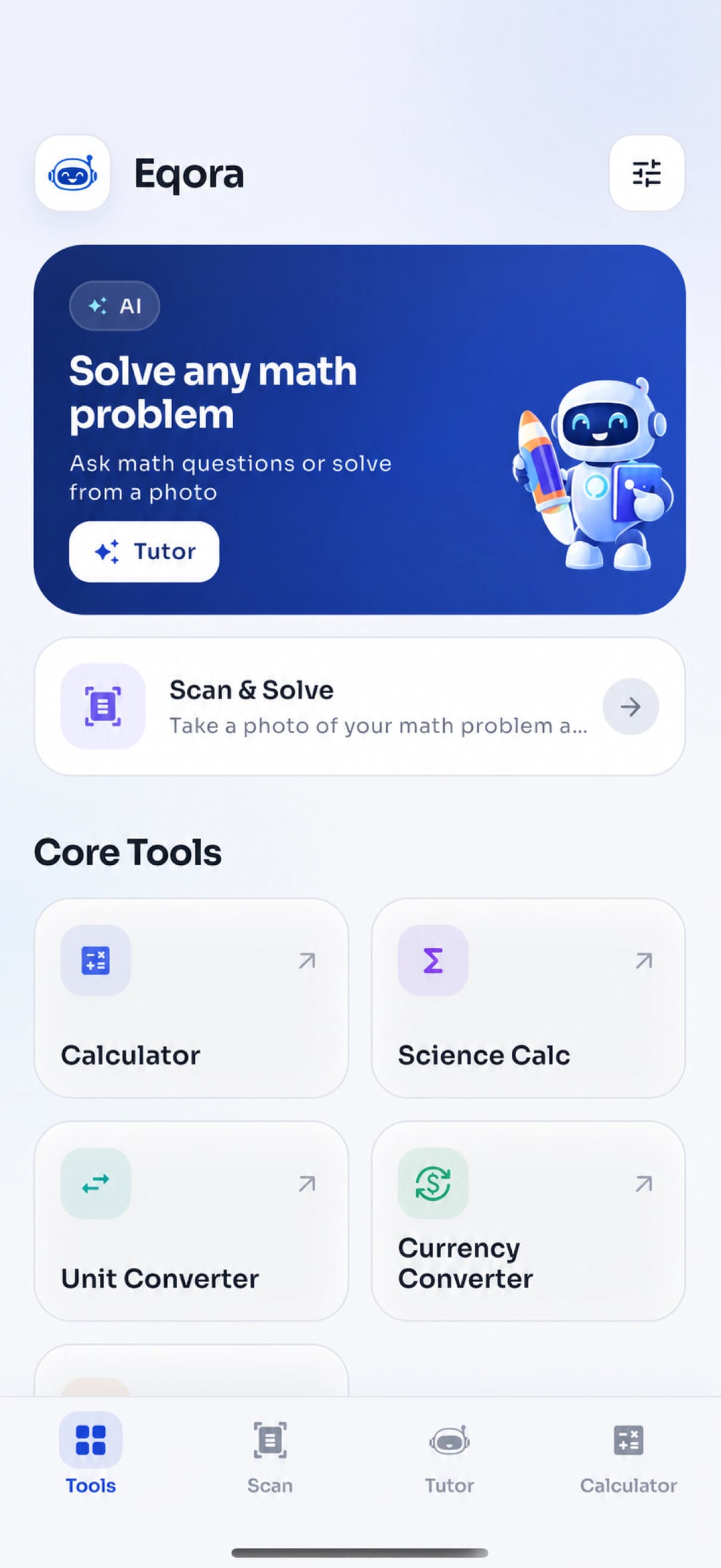
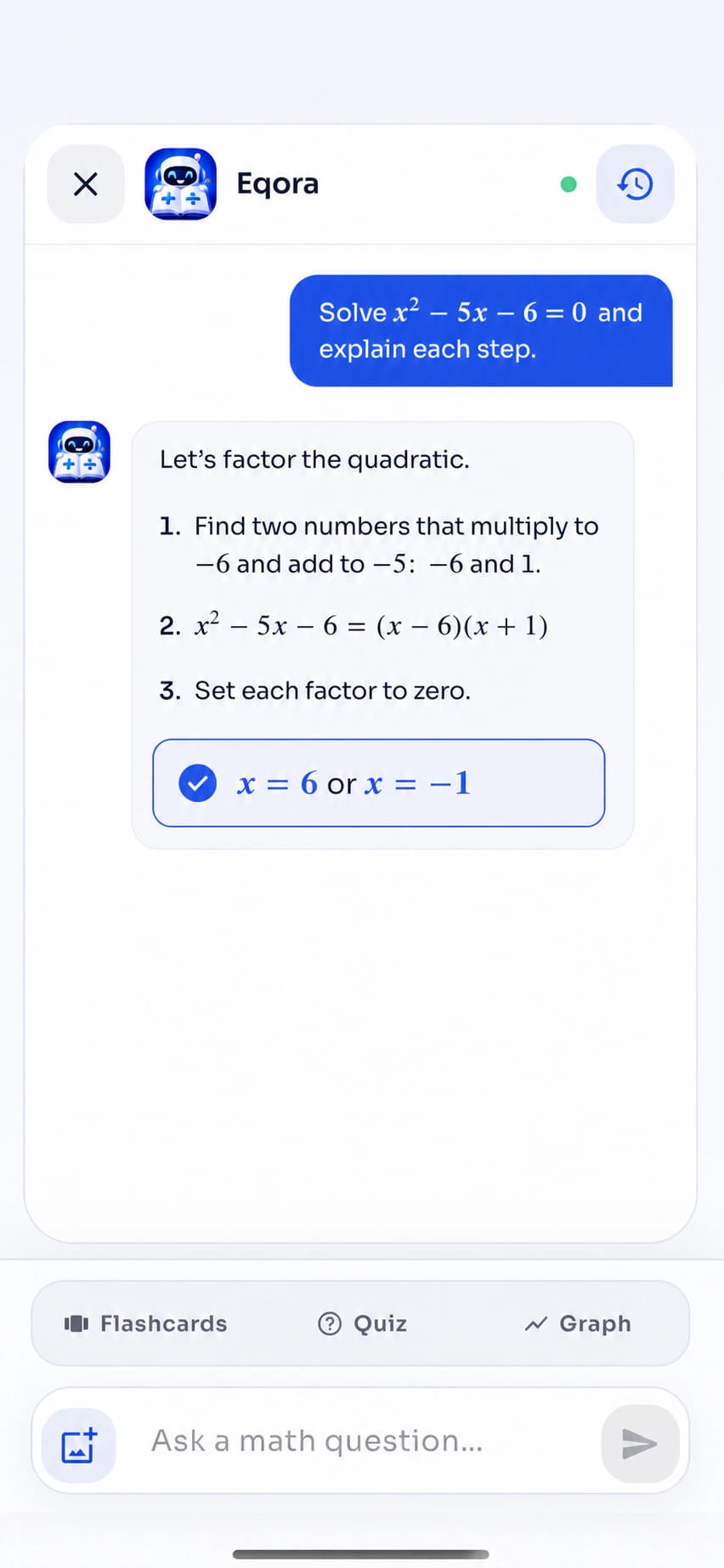
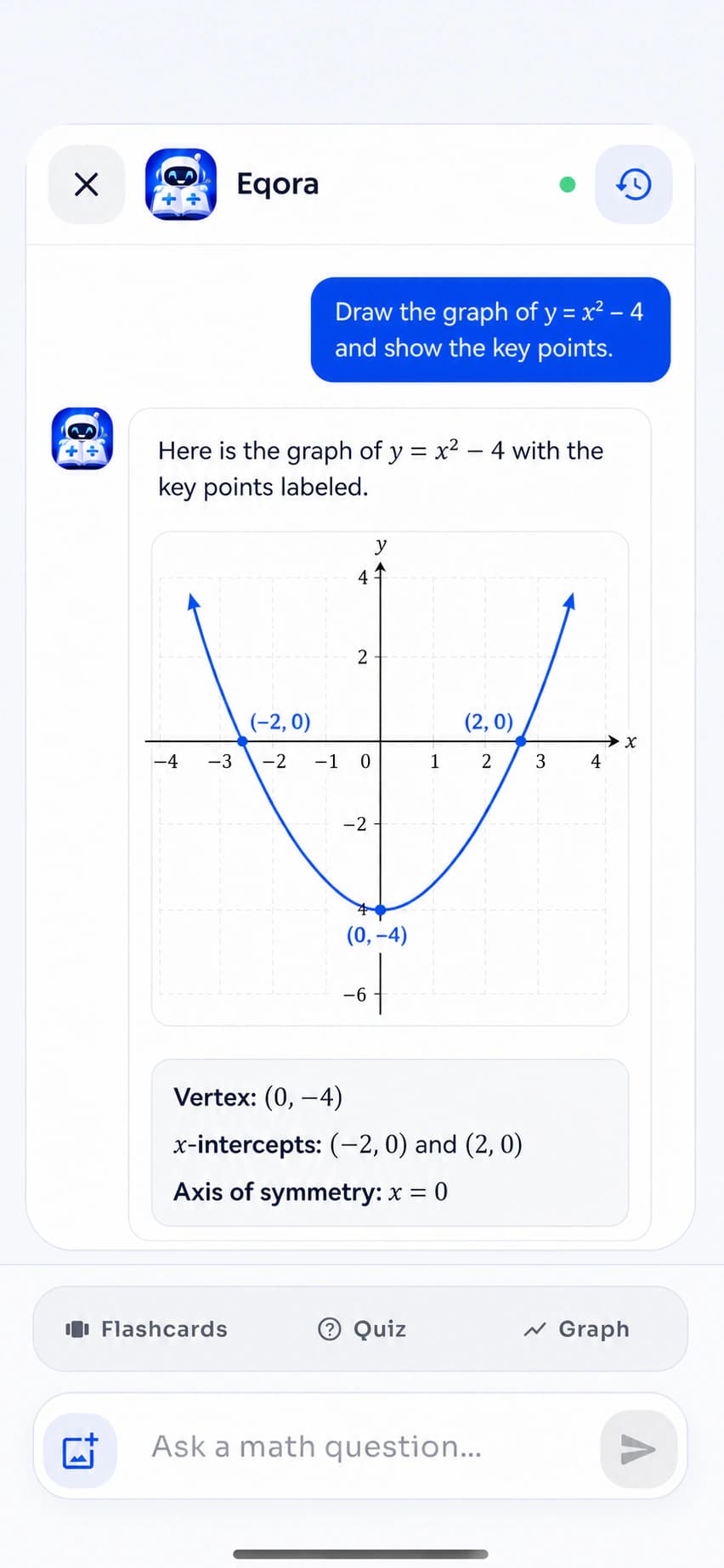
EsploraScorri o usa i controlli
Fatto per lo studio vero
Un aiuto compiti che lascia il pensiero a te.
Usa l’aiuto compiti con IA quando un foglio smette di avere senso, un concetto richiede un’altra spiegazione o gli esercizi d’esame rivela un punto debole. L’obiettivo è un aiuto utile con i compiti senza sostituire il tuo tentativo.

Sera dei compiti
Resta sul passo difficile invece di abbandonare tutto il problema.
Una domanda di approfondimento ben mirata può trasformare un blocco serale in un’idea concreta da ripassare domani.

Preparazione agli esami
Usa le spiegazioni per individuare argomenti deboli prima che lo faccia l’esame.
Ripassa il metodo, genera un breve quiz e inserisci gli argomenti meno sicuri nella prossima sessione di ripasso.

Richiamo attivo
Trasforma una domanda risolta in qualcosa che puoi richiamare da solo.
Chiudi con flashcard, un esercizio su un caso nuovo e una spiegazione finale con le tue parole.
Un esempio reale, passo dopo passo
Esplora il ragionamento dentro un’equazione quadratica.
Scegli una fase per vedere come una spiegazione utile passa dal leggere la struttura allo scegliere un metodo, risolvere e controllare il risultato.
Percorso interattivo del prodottoProblema di esempioRisolvi l’equazione quadratica
x² − 5x − 6 = 0
Pronto a risolverePasso 1 · Leggi la struttura
Identifica di che tipo di problema si tratta.
Questa è un’equazione quadratica in forma standard. Indicare i coefficienti rende più semplice lavorare sulla struttura.
a = 1, b = −5, c = −6
L’obiettivo è trovare ogni valore di x che rende l’espressione uguale a zero.
Quattro capitoli di prodotto collegati
Usa lo strumento più piccolo che fa avanzare il tuo apprendimento.
01 / Scan & Solve
Parti dal risolutore da foto.
Lo scanner di matematica acquisisce un esercizio stampato o a mano, ti lascia ritagliare ciò che non serve e restituisce una spiegazione strutturata. Questo flusso da foto evita di riscrivere espressioni lunghe e tiene l’attenzione sul ragionamento.
- Fotocamera o libreria foto
- Flusso di ritaglio mirato
- Contesto di conversazione salvato
02 / Tutor di matematica con IA
Resta sulla domanda finché il metodo non è chiaro.
Una prima spiegazione del risolutore non può sapere quale passaggio ti ha confuso. Continua con il tutor di matematica con IA: metti in discussione un cambio di segno, chiedi un esempio più semplice, confronta i metodi o chiedi su cosa esercitarti dopo.
- Domande di approfondimento nel contesto
- Spiegazioni alternative
- Esercizi nella stessa conversazione
03 / Impara e allenati
Trasforma un problema risolto in un’abilità riutilizzabile.
Apri Impara la matematica quando ti serve il concetto prima dell’esercizio. Genera un quiz per testare l’applicazione, salva idee chiave come flashcard o disegna un grafico quando la notazione ha bisogno di essere vista.
- Lezioni per argomenti strutturate
- Quiz e flashcard
- Grafici di funzioni generati con IA
04 / Strumenti di matematica
Fai il calcolo pratico senza cambiare app.
Alcune attività hanno bisogno di un’utilità mirata, non di una conversazione con IA. Tieni calcolo normale e scientifico, unità, valute e percentuali nello stesso spazio ordinato.
- Calcolatrice normale e scientifica
- Conversione di unità e valute
- Calcolatrice delle percentuali
App gratis di matematica con IA per iPhone e iPad
Uno scanner di matematica, un tutor di matematica con IA e un kit di studio che restano insieme.
Eqora è gratis da scaricare su iPhone e iPad compatibili. Parti dal risolutore da foto quando la domanda è già sulla carta, continua nel tutor di matematica con IA quando un passo ha bisogno di più spiegazione e chiudi con ripasso attivo che verifica ciò che hai imparato.
- Scansiona matematica stampata o a mano
- Fai domande di approfondimento nel contesto
- Crea quiz, flashcard e grafici


Scegli il tipo di aiuto giusto per la matematica
Risolutore da foto, aiuto compiti con IA o calcolatrice?
Ogni strumento risponde a un’esigenza diversa. Parti da quello più semplice che risolve il tuo dubbio e passa a una spiegazione o a nuovi esercizi solo quando serve.
La domanda è già sulla carta.
Scansiona un foglio, un libro o un esercizio del quaderno quando riscriverlo sarebbe lento o soggetto a errori. Includi l’enunciato completo, ritaglia problemi estranei e conferma che segni, frazioni ed esponenti siano stati letti bene.
Punto di partenza ideale- Esercizi stampati
- Scrittura chiara
- Equazioni lunghe
- Controlli dei compiti
Hai bisogno di capire il perché.
Vai oltre la prima soluzione quando un passo sembra troppo veloce, la spiegazione non è convincente o vuoi confrontare metodi. Una domanda di approfondimento mirata di solito è più utile che chiedere una risposta più lunga.
Punto di partenza ideale- Passaggi poco chiari
- Domande sui concetti
- Metodi alternativi
- Richieste di esercizi
Conosci già il metodo.
Scegli una calcolatrice normale o scientifica per aritmetica, valutazione, percentuali e controlli rapidi. Usa i convertitori per unità o valute. Torna al tutor quando ciò che manca è il ragionamento, non il calcolo.
Punto di partenza ideale- Controlli numerici
- Funzioni scientifiche
- Percentuali
- Conversioni di unità
Tutto dentro Eqora
Uno spazio per risolvere, imparare, allenarsi e verificare.
Questa app per i compiti collega uno scanner di matematica, un risolutore, un tutor di matematica con IA, esercizi e strumenti di calcolo. Usa solo ciò di cui ha bisogno il momento di studio attuale.
01Portalo
Parti dal problema che hai davanti.
Usa la fotocamera o la tastiera. Scegli ciò che rende più chiari notazione ed enunciato completo.
Risolutore da fotoInquadra matematica stampata o a mano e ritaglia esattamente l’esercizio.
Domande scritteScrivi direttamente quando ti serve aiuto su un concetto o sai già cosa chiedere.
02Capisci
Resta sul ragionamento.
Passa dal procedimento svolto al concetto o alla rappresentazione che chiarisce il passaggio successivo.
Aiuto passo dopo passoSegui tutti i passaggi del ragionamento invece di saltare direttamente al risultato.
Domande di approfondimentoChiedi perché un passaggio è valido, una spiegazione più semplice o un altro metodo di risoluzione.
Grafici di funzioniVisualizza forma, radici, intersezioni con gli assi, pendenza e comportamento della funzione.
03Allenati
Trasforma l’aiuto in apprendimento duraturo.
Ripassa l’idea, mettila alla prova e riprendila senza avere la soluzione aperta accanto.
Impara la matematicaRipassa argomenti strutturati, dalle basi all’analisi matematica.
Quiz generatiVerifica se sai applicare l’idea senza rileggere la soluzione.
Flashcard intelligentiTrasforma formule e concetti chiave in domande compatte per il ripasso attivo.
04Calcola
Tieni vicino gli strumenti per la matematica di tutti i giorni.
Controlla un calcolo o una conversione senza interrompere il ritmo di studio.
CalcolatricePassa tra modalità normale e scientifica nella stessa app.
Convertitore di unitàConverti le misure più comuni per scuola e vita quotidiana.
Convertitore di valuteTieni le conversioni di valuta comuni accanto agli altri strumenti per la matematica.
Strumenti per le percentualiCalcola variazioni percentuali, proporzioni, sconti e controlli rapidi.
Chiedi l’aiuto di cui hai davvero bisogno
Domande migliori, sessioni di studio migliori.
Un buon aiuto compiti con IA dovrebbe adattarsi alla domanda dietro la domanda. Non fermarti a «risolvi questo». Chiedi una diagnosi, una spiegazione più semplice, un secondo metodo, un grafico o un modo per metterti alla prova.
Leggi la guida del tutor01Diagnostica
«In quale punto esatto il mio approccio ha sbagliato?»
Condividi il tuo tentativo e concentrati sul primo passaggio errato.
02Semplifica
«Spiegamelo di nuovo con un esempio più piccolo.»
Cambia la spiegazione senza cambiare l’idea di fondo.
03Confronta
«Posso risolverlo con un altro metodo?»
Guarda quando conviene scomporre, sostituire o usare una formula.
04Visualizza
«Disegna il grafico della funzione e spiega le intersezioni con gli assi.»
Collega l’algebra alla forma della curva.
05Allenati
«Dammi un problema simile, ma nascondi la risposta.»
Trasferisci il metodo prima che la spiegazione ti sfugga.
06Ricorda
«Crea cinque flashcard con le idee chiave.»
Riassumi la sessione in domande da riprendere in seguito.
Lungo il programma
Costruisci le basi. Mantieni lo stesso ciclo di apprendimento quando la matematica si fa più difficile.
Risolvi problemi di matematica in fondamenti, algebra, geometria, trigonometria, statistica e calcolo. Dal senso numerico ai tassi di cambiamento, l’obiettivo resta lo stesso: che ogni trasformazione si possa spiegare.
Fondamenti
Frazioni · rapporti · percentuali · esponentiRafforza le operazioni e il senso numerico su cui poggiano gli argomenti successivi.
Algebra
Equazioni · funzioni · scomposizione · sistemiCapisci perché ogni trasformazione è valida e come si collegano i metodi.
Geometria
Angoli · figure · coordinate · misuraDistingui i dati indicati nella figura da ciò che il problema ti chiede di dimostrare.
Trigonometria
Triangoli · circonferenza unitaria · identità · graficiCollega significato geometrico, identità, equazioni e rappresentazioni grafiche.
Statistica
Probabilità · distribuzioni · dati · interpretazioneFai il calcolo senza perdere di vista cosa significa il risultato.
Analisi matematica
Limiti · derivate · integrali · tassiCollega notazione e regole a cambiamento, accumulo, pendenza e area.
Problemi di matematica popolari
Scansiona la domanda. Poi resta sulla parte che ha bisogno di spiegazione.
Usa il risolutore da foto per gli argomenti più comuni, dalla scuola all’università, e concentrati sulla parte che devi capire. Il percorso giusto dipende dal tipo di difficoltà: notazione, impostazione, calcolo, interpretazione o un prerequisito mancante.


01Equazioni e disequazioni
Risolvi 3x² − 2x − 8 = 0Algebra che mostra ogni trasformazione
Lavora su equazioni lineari, quadratiche, scomposizione, sistemi, disequazioni e notazione delle funzioni. Chiedi perché cambia un segno, quando bisogna verificare una soluzione o se un altro metodo è più breve.
Esplora questo percorso di studio02Problemi con testo
Trasforma la situazione in un’equazioneTraduci la storia prima di calcolare
Separa ciò che è dato da ciò che è sconosciuto, definisci le variabili, costruisci l’equazione e verifica se il valore finale ha senso nella situazione originale.
Esplora questo percorso di studio03Geometria
Trova la lunghezza o l’angolo mancanteCollega la figura al teorema
Esplora geometria analitica, area, volume, angoli, similitudine ed esercizi basati sui teoremi. Quando scansioni una figura, mantieni visibili etichette e misure fornite.
Esplora questo percorso di studio04Trigonometria
Risolvi sin(x) = 0.5Passa tra triangoli, identità e grafici
Chiedi come cambia il metodo se usi la circonferenza unitaria, un triangolo rettangolo, un’identità o il grafico di una funzione. Poi traccia da dove arrivano le restrizioni o le altre soluzioni.
Esplora questo percorso di studio05Statistica e probabilità
Interpreta il risultato, non solo il numeroTieni il significato accanto al calcolo
Ripassa impostazioni di probabilità, statistica descrittiva, distribuzioni e domande con dati. Usa domande di approfondimento per distinguere ciò che calcola una formula da ciò che dice il risultato.
Esplora questo percorso di studio06Analisi
Limiti · derivate · integraliVedi cosa sta descrivendo la notazione
Segui i passi di differenziazione e integrazione, torna all’algebra precedente e usa i grafici per collegare regole simboliche a pendenza, cambiamento, accumulo e area.
Esplora questo percorso di studioQuando i simboli hanno bisogno di un’immagine
Alcune idee si chiariscono nel momento in cui puoi vederle.
Chiedi a Eqora di disegnare il grafico di una funzione quando radici, punti di flesso, pendenza o comportamento a lungo termine sembrano ancora astratti. Usa l’immagine per spiegare l’algebra senza sostituirla.
- Collega un’equazione alla sua curva
- Parla di intersezioni con gli assi e punti di flesso
- Confronta come i cambiamenti di parametri influenzano la forma


LeggiRagionaVerifica
Come leggere soluzioni di matematica con IA
Una buona soluzione passo dopo passo dovrebbe essere facile da mettere in discussione.
La risposta più veloce non è sempre la più utile. Che tu usi un risolutore di algebra, un aiuto per l’analisi matematica o un risolutore di equazioni, fermati al primo passo che non sai spiegare tu. Queste quattro verifiche trasformano l’aiuto generato per i compiti in un processo di studio più attivo.
Conferma ciò che ha letto lo scanner.
Confronta il problema riconosciuto con l’originale. Un esponente, un segno meno, una parentesi o un’istruzione mancanti possono cambiare tutto il metodo.
Nomina la regola dietro ogni passaggio.
Una soluzione di matematica passo dopo passo dovrebbe spiegare perché ogni trasformazione è valida, non limitarsi a mostrare il calcolo successivo.
Controlla il risultato nel contesto.
Sostituisci le risposte quando puoi. Controlla unità, restrizioni del dominio, arrotondamenti e se il valore finale ha senso per la domanda.
Riprova senza la spiegazione.
Chiudi la risposta risolta e risolvi un problema correlato. Quel tentativo indipendente rivela se il metodo è davvero tuo.
Aiuto per la matematica a ogni fase di apprendimento
Dalle prime equazioni all’analisi universitaria.
L’interfaccia resta familiare mentre cambia la matematica: porta il problema intero, rivedi il metodo, chiedi l’idea che manca e chiudi con esercitazione autonoma.

Basi delle medie
Guadagna sicurezza prima che la notazione si addensi.
Usa esempi chiari di frazioni, rapporti, percentuali, numeri negativi, esponenti, equazioni introduttive, misura e geometria. I genitori possono leggere i passi insieme allo studente mentre resta lui o lei a gestire il tentativo finale.

Matematica delle superiori
Collega i capitoli invece di trattare ogni problema come nuovo.
Passa tra algebra, funzioni, geometria, trigonometria, probabilità, statistica e analisi matematica di base. Usa i quiz per individuare gli argomenti più deboli prima di una verifica e le domande di approfondimento per colmare il prerequisito che ti manca.

Università
Rallenta il lavoro avanzato sul passo che conta.
Ripassa algebra con più passaggi, analisi matematica, metodi quantitativi e calcoli tecnici senza perdere il metodo di fondo. Verifica i lavori importanti con i materiali del corso e usa Eqora solo quando il regolamento permette l’aiuto dell’IA.
Imparare funziona meglio in squadra
Utile per gli studenti e per chi li aiuta a pensare.
Eqora può dare un punto di partenza condiviso per la conversazione, mentre studente, genitore, tutor o insegnante tengono il giudizio nelle proprie mani.
Per gli studenti
Un passo successivo più calmo quando la pagina smette di avere senso.
Ottieni aiuto concreto senza perdere il filo del tuo tentativo, poi metti alla prova il metodo da solo.
Per i genitori
Una spiegazione condivisa quando il metodo scolastico è ormai lontano.
Usa i passi come punto di partenza per conversare e concentrati sul perché funziona il metodo, non solo se la risposta coincide.
Per tutor e insegnanti
Uno strumento di esercitazione che affianca l’insegnamento umano.
Usa esempi generati e domande di richiamo quando lo studio con IA è consentito, e lascia in primo piano le aspettative del corso e il tuo giudizio professionale.
Uso responsabile dell’IA
Tratta ogni risposta come qualcosa da rivedere.
Resti tu al comando. Eqora può interpretare male una foto o generare un passo errato. Segui le regole del tuo corso e verifica il lavoro importante.
- 01Prima di Eqora
Mostra il tuo tentativo
Segna dove si è fermato il tuo ragionamento invece di lasciare tutto il problema all’app.
- 02Durante l’aiuto
Metti in discussione ogni salto
Chiedi perché vale una regola, cosa è cambiato e se un altro metodo è d’accordo.
- 03Prima di usarlo
Verifica il risultato
Controlla segni, restrizioni, unità e passi importanti con materiali approvati.
- 04Prima di andare avanti
Prova da solo
Chiudi la spiegazione e risolvi un problema correlato senza supporto.
Dopo la prima risposta
Trasforma un problema di matematica risolto in un piano di ripasso breve.
Una soluzione svolta è solo l’inizio. Usa lo stesso argomento per riconoscere un andamento visivo, ricostruire il metodo da solo e controllare il calcolo finale. Così l’aiuto con i compiti di matematica resta utile dopo aver finito la domanda originale.
01 · Guardalo
Collega l’equazione al suo grafico.
Chiedi il grafico di una funzione quando radici, pendenza, intersezioni con gli assi o punti di flesso si capiscono meglio vedendoli.
02 · Mettilo alla prova
Crea un quiz sullo stesso argomento.
Genera una nuova serie di domande e risolvile senza riaprire la soluzione passo dopo passo originale.
03 · Controllalo
Verifica il calcolo con lo strumento giusto.
Usa la calcolatrice scientifica per aritmetica e valori di funzioni una volta che capisci il metodo che stai controllando.
Un ciclo di studio semplice:Spiega il metodo con le tue parole.Applicalo a un nuovo problema.Torna più tardi e recuperalo di nuovo.
Rendi l’app più utile
Guide pratiche per ottenere risultati più chiari e studiare meglio.

01Scansiona meglio
Come fotografare un problema di matematica per un risultato più chiaro
Inquadratura, luce, scrittura a mano, diagrammi e i piccoli dettagli che migliorano il riconoscimento.
Leggi la guida
02Impara meglio
Come usare l’aiuto compiti di matematica con IA senza copiare le risposte
Un metodo semplice: prova, chiedi chiarimenti e allenati, mantenendo il controllo del ragionamento.
Leggi la guida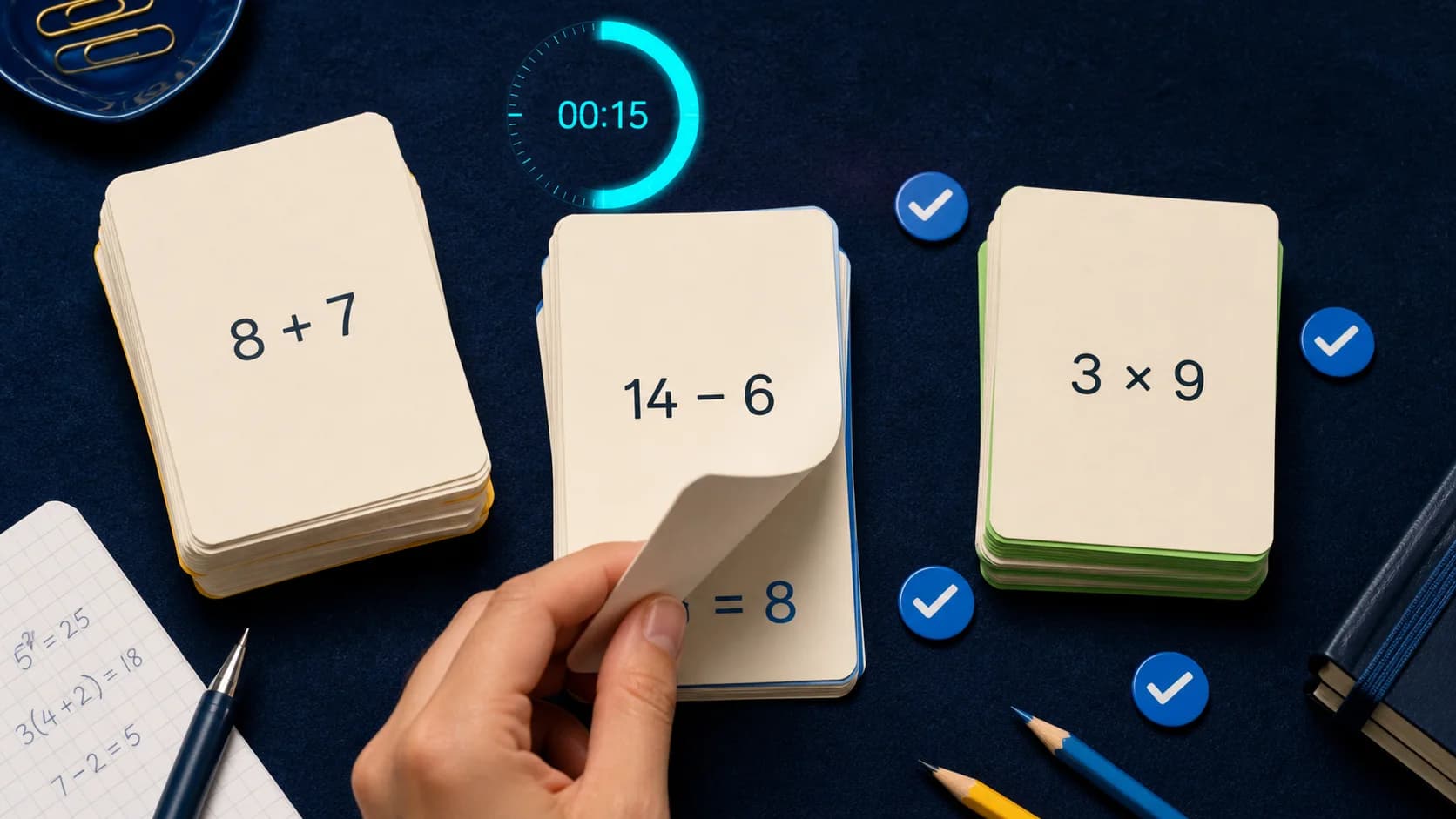
03Ripassa meglio
Come trasformare le spiegazioni in quiz e flashcard
Trasforma l’esercizio svolto in esercitazione attiva mentre il concetto è ancora fresco.
Leggi la guidaEqora, spiegato con chiarezza
Capisci cosa fa l’app e dove l’IA ha ancora bisogno del tuo giudizio.
Risposte dirette su funzioni, disponibilità, prezzi, flussi di studio e i limiti dell’aiuto per la matematica generato.
Vai al supportoCos’è Eqora?
Eqora è un tutor di matematica con IA, un risolutore da foto e una raccolta di strumenti didattici per iPhone e iPad. Scansiona o scrivi un problema, studia la spiegazione, fai domande di approfondimento e allenati sullo stesso argomento.
Eqora può leggere un problema da una foto?
Sì. Usa Scan & Solve con un problema stampato o a mano, ritaglia l’esercizio rilevante e invialo per una spiegazione strutturata. Le immagini nitide e ben illuminate funzionano meglio.
Posso fare domande su un passo concreto?
Sì. Continua la conversazione con il tutor per capire perché si applica una regola, ottenere una spiegazione più semplice, confrontare un altro metodo, generare un grafico o creare nuovi esercizi.
Quali livelli e materie posso studiare?
Eqora è pensata per studenti dalle medie all’università e copre argomenti comuni di fondamenti, algebra, geometria, trigonometria, statistica, analisi matematica e altri argomenti. Le prestazioni variano a seconda della domanda.
Eqora include quiz e flashcard?
Sì. Puoi generare quiz e flashcard a partire da un argomento o da una conversazione con il tutor, per passare dalla lettura di una spiegazione al ripasso attivo.
Eqora è gratis?
Eqora è gratis da scaricare e offre abbonamenti Premium opzionali per un maggiore uso di IA. Prezzi attuali, periodi di fatturazione e condizioni di rinnovo compaiono nell’app prima dell’acquisto.
Le soluzioni generate dall’IA sono sempre corrette?
No. Le foto possono essere interpretate male e l’IA può sbagliare. Controlla i passi importanti con i materiali del corso e usa Eqora come supporto del tutor, non come una raccolta di risposte da accettare senza domande.
Dove posso scaricare Eqora?
Eqora versione 1.0 è già disponibile sull’App Store di Apple per iPhone e iPad compatibili con iOS 15.6 o successivo. Per ora non è un’app Android né web.
