
Best Free AI Math Solver App
AI Math Homework Helper for Clear, Step-by-Step Solutions.
Scan or type any math problem with Eqora's photo math solver. Get clear explanations, ask follow-up questions, and practice with quizzes or flashcards.
- Scan printed or handwritten math homework
- No registration required. Start for free
- Available on iOS, iPhone and iPad

01020304
Start clearlyBring the full problem
Keep goingReason, question, practice
See Eqora in action
One problem. Every useful next step in the same app.
Eqora connects a photo math scanner, homework solver, and AI math helper in one focused workflow. Start with the problem in front of you, stay with the explanation until it clicks, then practice until the method is really yours.

01
CaptureBring in the complete problem
Keep the instruction, notation, and your own attempt together from the start.
02
ReasonUnpack the method
Move through the reasoning in order and stop at the first unexplained jump.
03
QuestionAsk about what is missing
Request a simpler explanation, another method, or a smaller example in context.
04
TransferProve the idea is yours
Finish with a related problem, quiz, or recall prompt before the explanation fades.
The short answer
How does a Math AI homework helper work?
A Math AI homework helper responds with more than a final result. Photograph a printed or handwritten question, type an equation, or describe the exact idea that is confusing you. Eqora explains the method step by step and keeps the conversation open.
Ask why a transformation is valid, request a smaller example, compare another method, or create practice from the same topic. A calculator evaluates; a photo math solver reads the problem; a tutor helps you inspect the reasoning. Eqora brings all three roles together on iPhone and iPad.
Photo or typed inputStep-by-step reasoningFollow-up questionsPractice from the same topic
Read the complete plain-English guide More than the answer
Finish tonight’s problem. Understand tomorrow’s version too.
A final answer may complete one exercise. It does not teach you how to recognize the same method when the numbers change.
Eqora lets you slow down the exact step that lost you, ask why it works, compare another method, and test the idea on a new problem.
Available for iPhone & iPad
Your math tutor, right on your iPhone.
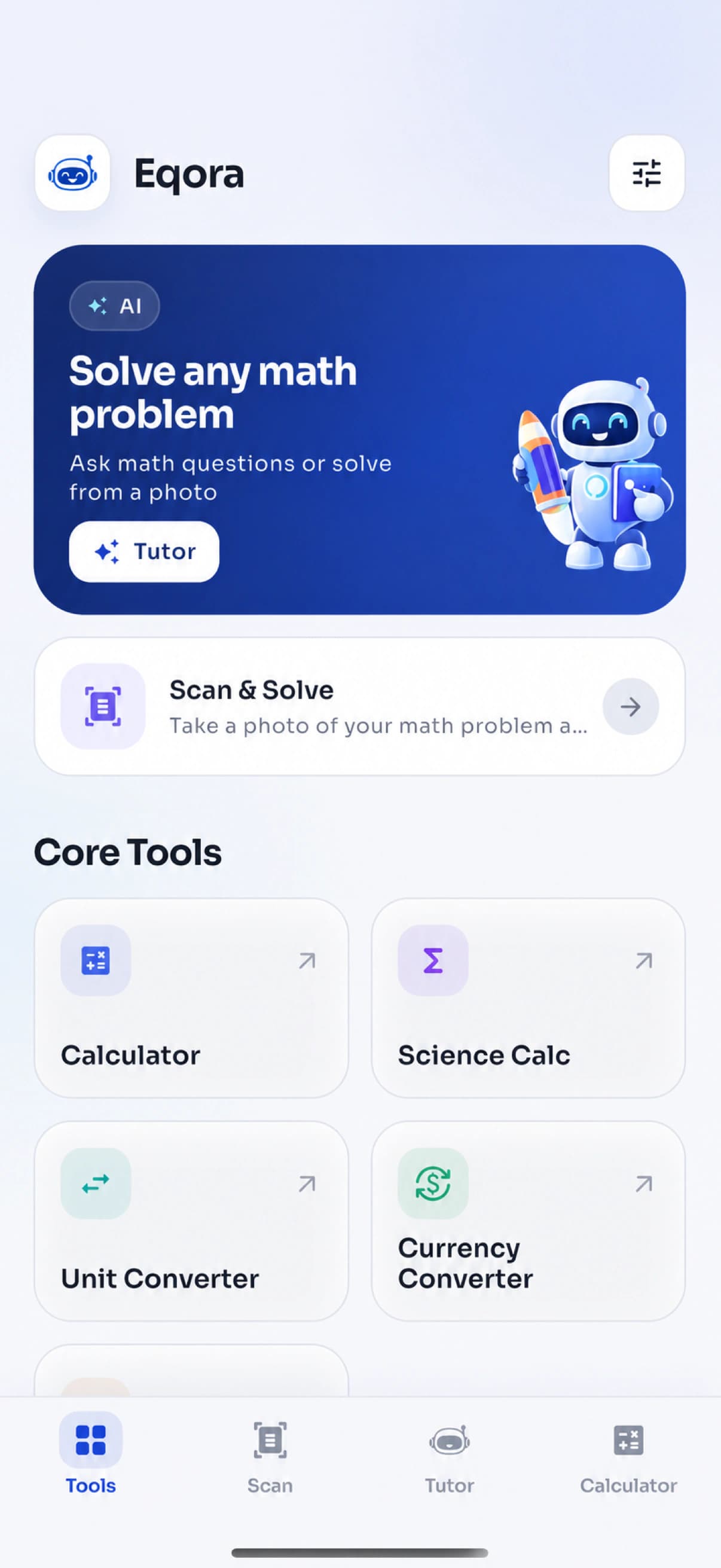
Eqora brings an AI math solver, photo scanner, graphing, and practice tools into one focused iOS app. Start with a question, inspect the reasoning, and keep asking until the method makes sense.
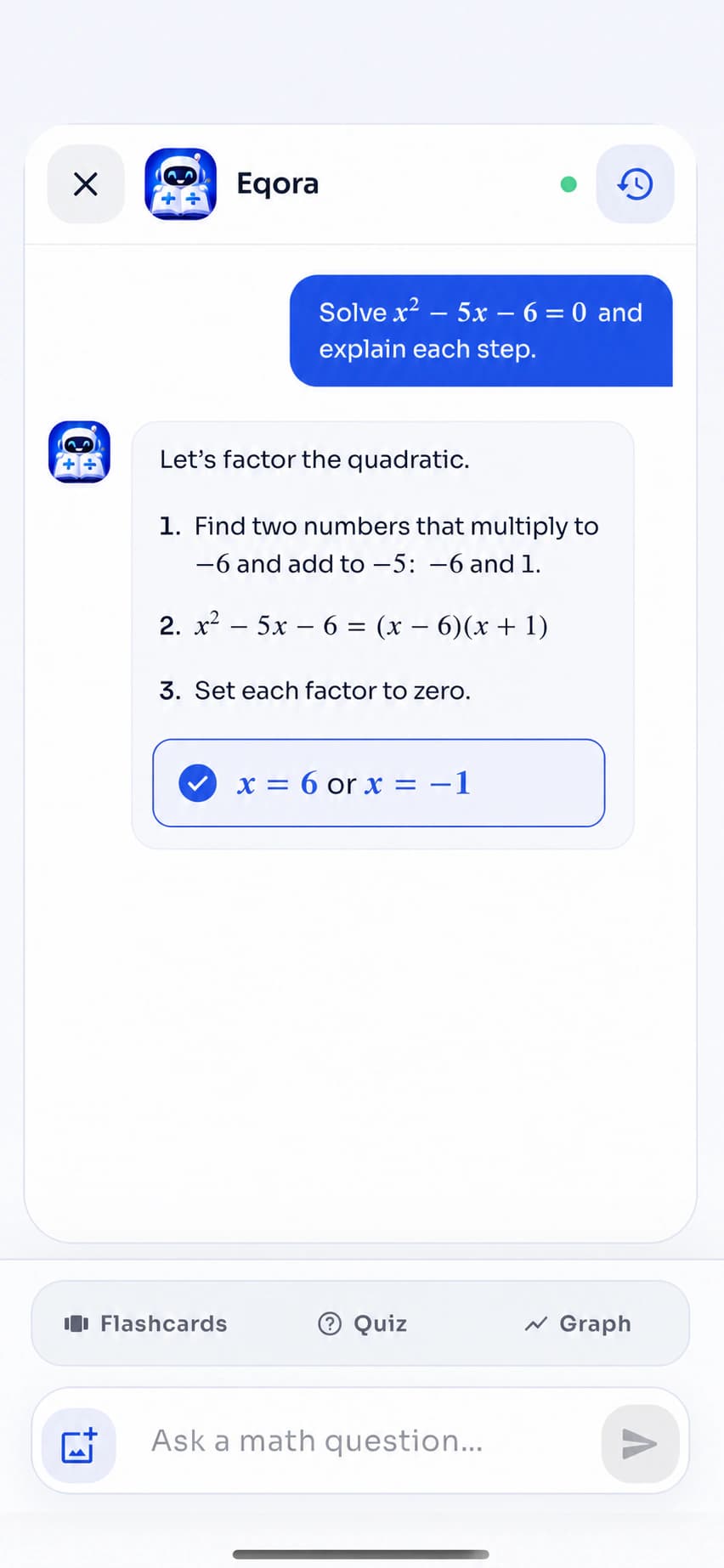
- Solve equations with clear explanations
- Ask follow-up questions in the same chat
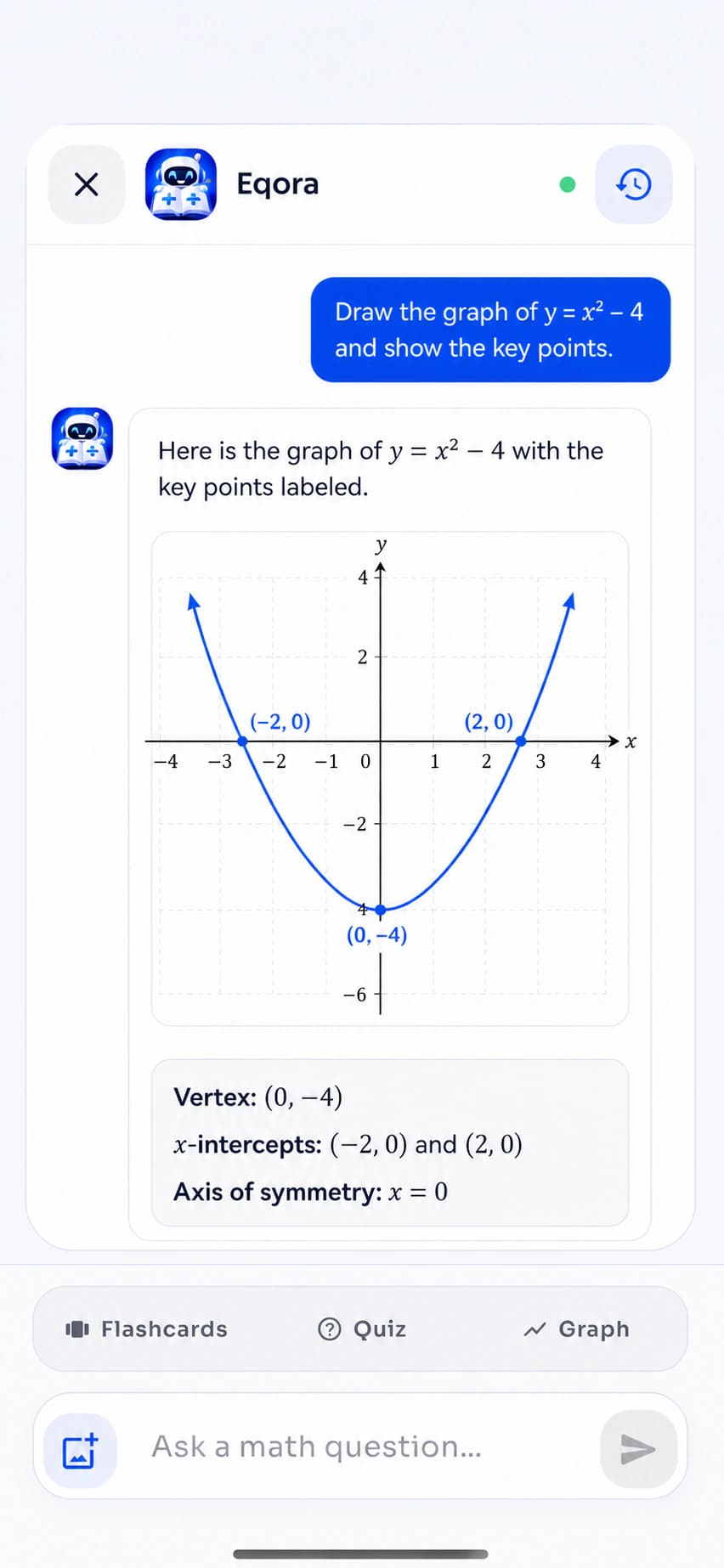
- Turn functions into visual graphs
- Scan homework or type the problem yourself
ExploreSwipe or use the controls
Built for real study
A homework helper that still leaves the thinking with you.
Use the Math AI homework helper when a worksheet stops making sense, a concept needs another explanation, or exam practice reveals a weak spot. The goal is useful homework help without replacing your own attempt.

Homework night
Stay with the difficult step instead of abandoning the whole problem.
A focused follow-up can turn a late-night block into one precise idea to revisit tomorrow.

Exam preparation
Use explanations to locate weak topics before the test does.
Review the method, generate a short quiz, and put missed ideas into the next revision block.

Active recall
Turn a solved question into something you can retrieve from memory.
Finish with flashcards, a transfer problem, and a final explanation in your own words.
A real example, step by step
Explore the reasoning inside one quadratic equation.
Select a stage to see how a useful explanation moves from reading the structure to choosing a method, solving, and checking the result.
Interactive product walkthroughExample problemSolve the quadratic equation
x² − 5x − 6 = 0
Ready to solveStep 1 · Read the structure
Identify what kind of problem this is.
This is a quadratic equation in standard form. Naming the coefficients makes the structure easier to work with.
a = 1, b = −5, c = −6
The goal is to find every value of x that makes the expression equal zero.
Four connected product chapters
Use the smallest tool that moves your learning forward.
01 / Scan & Solve
Begin with a photo math solver.
The math scanner captures a printed or handwritten exercise, lets you crop out unrelated work, and returns a structured explanation. This photo math workflow avoids retyping long expressions and keeps attention on the reasoning.
- Camera or photo library
- Focused cropping flow
- Saved conversation context
02 / Math AI Tutor
Stay with the question until the method clicks.
A first math solver explanation cannot know which line confused you. Continue with the Math AI tutor: challenge a sign change, request a smaller example, compare methods, or ask what to practice next.
- Contextual follow-up questions
- Alternative explanations
- Practice from the same chat
03 / Learn & Practice
Turn one solved problem into a reusable skill.
Open Learn Math when you need the concept before the exercise. Generate a quiz to test application, save key ideas as flashcards, or draw a graph when the notation needs a visual.
- Structured topic lessons
- Quizzes and flashcards
- AI-generated function graphs
04 / Math Tools
Handle the practical calculation without changing apps.
Some tasks need a focused utility, not an AI conversation. Keep standard and scientific calculation, units, currency, and percentages inside the same clean workspace.
- Normal and scientific calculator
- Unit and currency conversion
- Percentage calculator
Free AI math solver app for iPhone and iPad
A math scanner, AI tutor, and study toolkit that stays together.
Eqora is free to download on compatible iPhone and iPad devices. Start with the photo math solver when the question is already on paper, continue in the AI math tutor when a step needs more explanation, and finish with practice that checks your memory.
- Scan printed or handwritten math
- Ask follow-up questions in context
- Create quizzes, flashcards, and graphs


Choose the right kind of math help
Photo math solver, AI homework helper, or calculator?
They solve different study problems. Start with the smallest tool that answers the question you actually have, then move into explanation or practice only when it helps.
The question is already on paper.
Scan a worksheet, textbook, or notebook exercise when retyping it would be slow or error-prone. Include the full instruction, crop away unrelated problems, and confirm that signs, fractions, and exponents were read correctly.
Best starting point- Printed exercises
- Clear handwriting
- Long equations
- Homework checks
You need to understand why.
Continue beyond the first solution when one step feels too fast, the wording does not connect, or you want to compare methods. A focused follow-up is often more useful than asking for a longer answer.
Best starting point- Unclear steps
- Concept questions
- Alternative methods
- Practice requests
You already know the method.
Choose a standard or scientific calculator for arithmetic, evaluation, percentages, and quick checks. Use converters for units or currency. Switch back to tutoring when the missing piece is reasoning rather than computation.
Best starting point- Numerical checks
- Scientific functions
- Percentages
- Unit conversions
Everything inside Eqora
One workspace for solving, learning, practicing, and checking.
This homework app connects a math scanner, math solver, conversational tutor, practice, and calculation tools. Use only what the current study moment needs.
01Bring it in
Start with the problem in front of you.
Use a camera or the keyboard. Choose whichever keeps the notation and full instruction clearest.
Photo scanCapture printed or handwritten math and crop to the exact exercise.
Typed questionsAsk directly when you need concept help or already know what to type.
02Understand
Stay with the reasoning.
Move from a worked method to the exact concept or visual that makes the next step click.
Step-by-step helpFollow the intermediate reasoning instead of jumping to the last line.
Follow-up explanationsAsk why, simplify the language, or request another solving method.
Function graphsVisualize shape, roots, intercepts, slope, and function behavior.
03Practice
Turn help into recall.
Review the idea, test it, and revisit it without keeping the solution open beside you.
Learn MathReview structured topics from fundamentals through calculus.
Generated quizzesTest whether you can apply the idea without rereading the solution.
Smart flashcardsTurn key formulas and concepts into compact active-recall prompts.
04Calculate
Keep everyday math tools close.
Check a calculation or conversion without breaking the flow of the study session.
CalculatorSwitch between normal and scientific modes inside the same app.
Unit converterConvert common measurements for school and everyday calculations.
Currency converterKeep common currency conversions alongside your other math tools.
Percentage toolsHandle percentage change, proportions, discounts, and quick checks.
Ask for the help you actually need
Better prompts create better study sessions.
A useful AI homework helper should adapt to the question behind the question. Do not stop at “solve this.” Ask for a diagnosis, a simpler explanation, a second method, a visual, or a way to test yourself.
Read the tutor guide01Diagnose
“Where exactly did my approach go wrong?”
Share your attempt and focus on the first incorrect move.
02Simplify
“Explain this again with a smaller example.”
Change the explanation without changing the underlying idea.
03Compare
“Can I solve this using another method?”
See when factoring, substitution, or a formula is the better fit.
04Visualize
“Graph the function and explain the intercepts.”
Connect symbolic work with the behavior of the curve.
05Practice
“Give me a similar problem, but hide the answer.”
Transfer the method before the explanation leaves your memory.
06Recall
“Make five flashcards from the key ideas.”
Compress the session into prompts you can revisit later.
Across the syllabus
Build the foundation. Keep the same learning loop as math gets harder.
Solve math problems across fundamentals, algebra, geometry, trigonometry, statistics, and calculus. From number sense to rates of change, the goal stays the same: make every transformation explainable.
Fundamentals
Fractions · ratios · percentages · exponentsStrengthen the operations and number sense that later topics rely on.
Algebra
Equations · functions · factoring · systemsUnderstand why each transformation is valid and how methods connect.
Geometry
Angles · shapes · coordinates · measurementSeparate what a diagram gives you from what the problem asks you to prove.
Trigonometry
Triangles · unit circle · identities · graphsMove between geometric meaning, identities, equations, and visual behavior.
Statistics
Probability · distributions · data · interpretationWork through the calculation while keeping the meaning of the result visible.
Calculus
Limits · derivatives · integrals · ratesConnect notation and rules to change, accumulation, slope, and area.
Popular math problems
Scan the question. Then stay for the part that needs explaining.
Use the photo math solver for common school and university topics, then continue with the part you need to understand. The right math solver workflow depends on whether the challenge is notation, setup, calculation, interpretation, or a missing prerequisite.


01Equations & inequalities
Solve 3x² − 2x − 8 = 0Algebra that shows every transformation
Work through linear equations, quadratics, factoring, systems, inequalities, and function notation. Ask why a sign changes, when a solution must be checked, or whether another method is shorter.
Explore this study path02Word problems
Turn the situation into an equationTranslate the story before calculating
Separate the given information from the unknown, define variables, build the equation, and check whether the final value makes sense in the original situation.
Explore this study path03Geometry
Find the missing length or angleConnect the diagram to the rule
Explore coordinate geometry, area, volume, angles, similarity, and common theorem-based questions. Keep labels and given measurements visible when you scan a diagram.
Explore this study path04Trigonometry
Solve sin(x) = 0.5Move between triangles, identities, and graphs
Ask how the unit circle, a right triangle, an identity, or a function graph changes the method. Then trace where restrictions or additional solutions come from.
Explore this study path05Statistics & probability
Interpret the result, not only the numberKeep the meaning beside the calculation
Review probability setups, descriptive statistics, distributions, and data questions. Use follow-ups to distinguish what a formula computes from what the result says.
Explore this study path06Calculus
Limits · derivatives · integralsSee what the notation is describing
Follow differentiation and integration steps, revisit prerequisite algebra, and use graphs to connect symbolic rules with slope, change, accumulation, and area.
Explore this study pathWhen symbols need a picture
Some ideas become clearer the moment you can see them.
Ask Eqora to graph a function when roots, turning points, slope, or long-term behavior still feel abstract. Use the visual to explain the algebra without replacing it.
- Connect an equation to its curve
- Discuss intercepts and turning points
- Compare how parameter changes affect shape


ReadReasonVerify
Reading AI math solutions
A good step-by-step solution should be easy to question.
The fastest answer is not always the most useful one. Whether you are using an algebra solver, a calculus helper, or a math equation solver, slow down at the first step you cannot explain yourself. These four checks turn generated homework help into a more active study process.
Confirm what the scanner read.
Compare the captured question with the original. A missed exponent, minus sign, bracket, or instruction can change the whole method.
Name the rule behind each move.
A useful step-by-step math solution should tell you why a transformation is valid, not only show a cleaner line underneath it.
Check the result in context.
Substitute answers where possible. Review units, domain restrictions, rounding, and whether the final value makes sense for the question.
Retry without the explanation.
Close the worked answer and solve a related problem. That independent attempt reveals whether the method is available from memory.
Math help by learning stage
From first equations to university calculus.
The interface stays familiar as the mathematics changes: bring the complete problem, inspect the method, ask about the missing idea, and finish with independent practice.

Middle school foundations
Build confidence before the notation gets crowded.
Use clear examples for fractions, ratios, percentages, negative numbers, exponents, introductory equations, measurement, and geometry. Parents can read the steps together with a student while keeping the student responsible for the final attempt.

High school mathematics
Connect chapters instead of treating every problem as new.
Move between algebra, functions, geometry, trigonometry, probability, statistics, and introductory calculus. Use quizzes to identify weak topics before an exam and follow-ups to repair the exact prerequisite that is missing.

College & university
Slow advanced work down at the step that matters.
Review multi-step algebra, calculus, quantitative methods, and technical calculations without losing the surrounding method. Verify important work against your course materials and use Eqora only where your class permits AI assistance.
Learning works better together
Useful for students and the people helping them think.
Eqora can give a shared starting point for a conversation, while the learner, parent, tutor, or teacher keeps judgment in the loop.
For students
A calmer next step when the page stops making sense.
Get specific help without losing the thread of your own attempt, then test the method independently.
For parents
A shared explanation when the old school method feels far away.
Use the steps as a conversation starter and focus on why the method works instead of only checking whether the answer matches.
For tutors & teachers
A practice companion that supports human teaching.
Use generated examples and recall prompts for permitted study while keeping course expectations and professional judgment in charge.
Responsible AI use
Treat every answer as something to inspect.
Your judgment stays in charge. Eqora can misread a photo or generate an incorrect step. Follow your course rules and verify important work.
- 01Before Eqora
Show your attempt
Mark where your reasoning stopped instead of outsourcing the whole problem.
- 02During help
Question each jump
Ask why a rule applies, what changed, and whether another method agrees.
- 03Before using it
Verify the result
Check signs, constraints, units, and important steps against approved materials.
- 04Before moving on
Retry independently
Close the explanation and solve a related problem with no support.
After the first answer
Turn one solved math problem into a short revision plan.
A worked solution is only the beginning. Use the same topic to reveal a visual pattern, retrieve the method from memory, and check the final calculation. This keeps math homework help useful after the original question is finished.
01 · See it
Connect the equation to its graph.
Ask for a function graph when roots, slope, intercepts, or turning points are easier to understand visually.
02 · Test it
Create a quiz from the same topic.
Generate a fresh set of questions and solve them without reopening the original step-by-step solution.
03 · Check it
Verify the calculation with the right tool.
Use the scientific calculator for arithmetic and function values once you understand the method you are checking.
A simple study loop:Explain the method in your own words.Practice it on a new question.Return later and retrieve it again.
Make the app more useful
Practical guides for better inputs and better learning habits.

01Scan better
How to photograph a math problem for a clearer result
Framing, lighting, handwriting, diagrams, and the small details that improve recognition.
Read guide
02Learn better
How to use AI math help without copying answers
A practical loop of attempting, questioning, and practicing that keeps the reasoning in your hands.
Read guide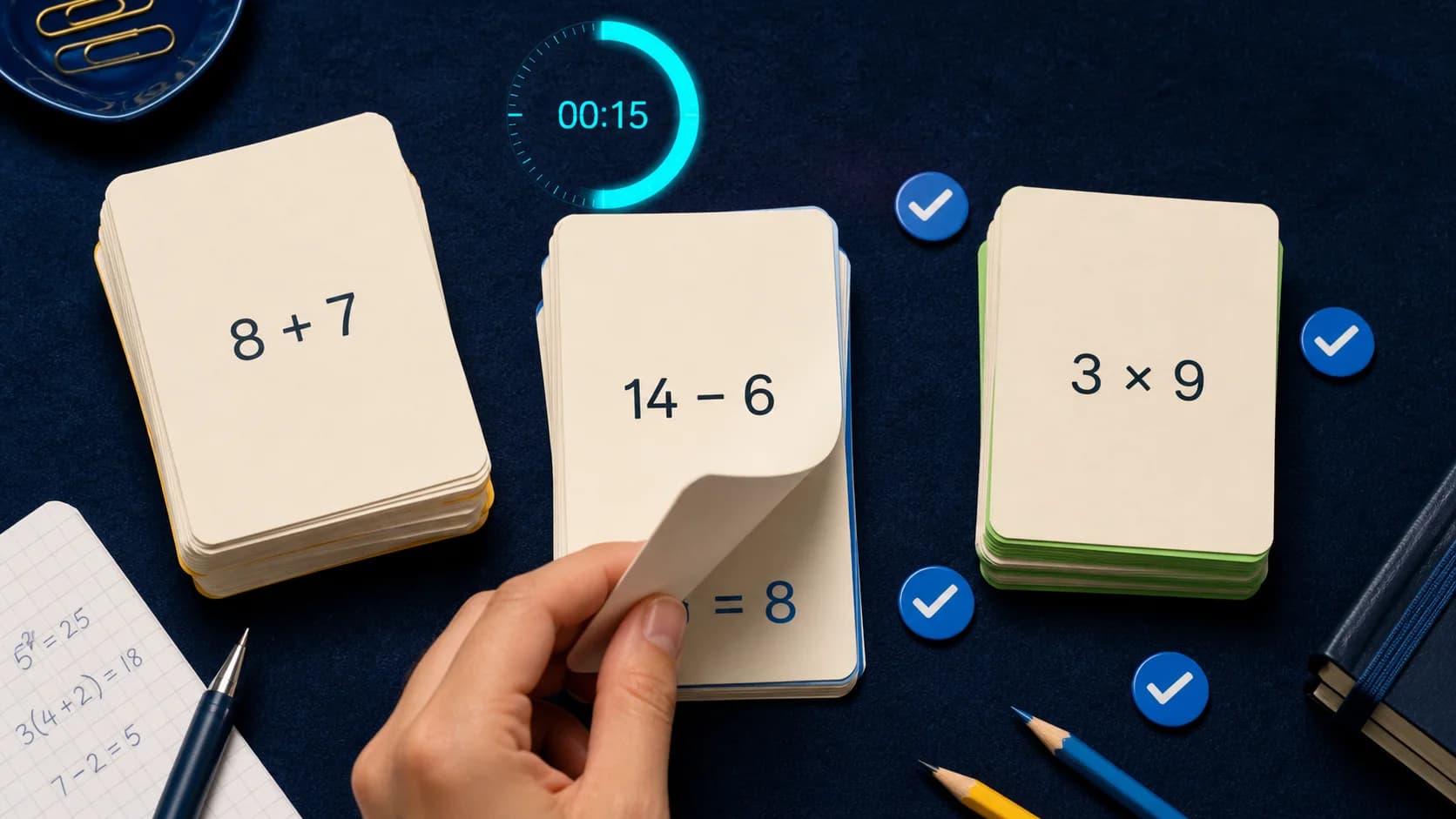
03Revise better
How to turn explanations into quizzes and flashcards
Convert solved work into active recall while the concept is still fresh.
Read guideEqora, clearly explained
Know what the app does and where AI still needs judgment.
Straight answers about features, availability, pricing, study workflows, and the limits of generated math help.
Visit supportWhat is Eqora?
Eqora is an AI math tutor, photo math solver, learning library, and math toolkit for iPhone and iPad. Scan or type a question, study the explanation, ask follow-ups, and turn the topic into practice.
Can Eqora read a problem from a photo?
Yes. Use Scan & Solve with a printed or handwritten problem, crop to the relevant exercise, and send it for a structured explanation. Sharp, evenly lit images work best.
Can I ask questions about an individual step?
Yes. Continue in the tutor conversation to ask why a rule applies, request simpler wording, explore another method, generate a graph, or create practice.
Which levels and subjects can I study?
Eqora is designed for learners from middle school through university and supports common topics across fundamentals, algebra, geometry, trigonometry, statistics, calculus, and more. Performance varies by question.
Does Eqora include quizzes and flashcards?
Yes. You can generate quizzes and flashcards from a topic or tutor conversation, helping you move from reading an explanation to active recall.
Is Eqora free?
Eqora is free to download and offers optional Premium subscriptions for higher AI usage. Current prices, billing periods, and renewal terms appear in the app before purchase.
Are AI-generated solutions always correct?
No. Photos can be misread and AI can make mistakes. Check important steps against class materials and use Eqora as a tutoring aid, not an unquestioned answer key.
Where can I download Eqora?
Eqora version 1.0 is available now through Apple’s App Store for compatible iPhone and iPad devices running iOS 15.6 or later. It is not currently an Android or web app.
